
Artificial IntelligencePublished on 4 min read
Best Practices and Tools for Implementing AI and ML in IT Projects

Bhim MridhaSr. AI Developer
On this page
Artificial Intelligence (AI) and Machine Learning (ML) are no longer experimental technologies—they are now core drivers of innovation in IT projects across industries. From predictive analytics and intelligent automation to smart testing and customer support, AI/ML can significantly improve efficiency, accuracy, and decision-making.
However, successful implementation requires more than just choosing the right algorithm. It demands the right strategy, tools, data, team skills, and best practices. In this blog, we’ll explore a practical, end-to-end guide for implementing AI and ML effectively in IT projects.
Why AI & ML Matter in IT Projects
AI and ML help IT teams:
- Automate repetitive and manual tasks
- Improve software quality and testing accuracy
- Analyze large volumes of data faster
- Enhance user experience through personalization
- Predict system failures and optimize performance
Whether you are working on QA automation, DevOps, enterprise software, or data-driven applications, AI/ML can add measurable value when implemented correctly.
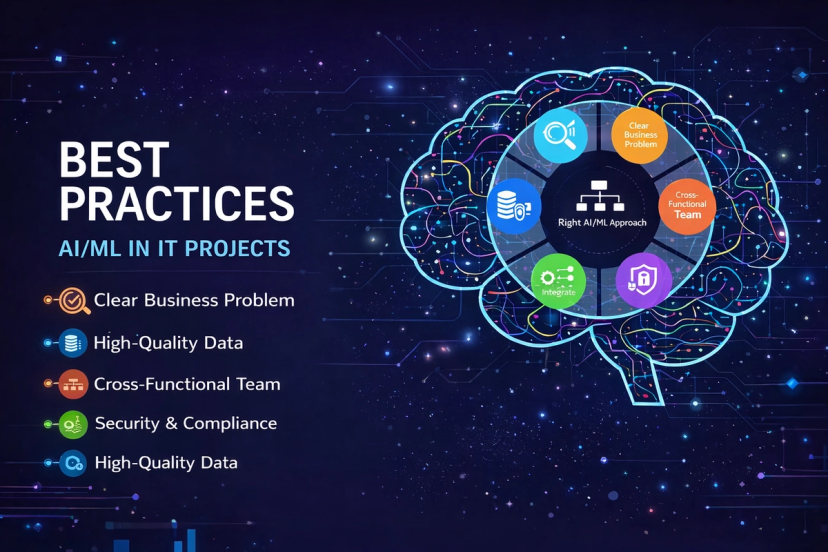
Best Practices for Implementing AI and ML in IT Projects
1. Start with a Clear Business Problem
One of the most common mistakes is adopting AI without a clear objective.
Best practice:
- Define a specific problem (e.g., reduce test execution time, detect defects earlier, improve customer response)
- Identify KPIs such as accuracy, cost reduction, or time saved
- Ensure AI solves a real business pain point, not just a technical curiosity
2. Focus on High-Quality Data
AI and ML models are only as good as the data they are trained on.
Best practice:
- Use clean, structured, and relevant datasets
- Remove duplicates, missing values, and noise
- Ensure data consistency across sources
- Regularly update datasets to avoid outdated models
Tip: Spend at least 60–70% of project effort on data preparation.
3. Choose the Right AI/ML Approach
Not every problem requires deep learning.
Examples:
- Rule-based automation: Simple workflows and validations
- Machine Learning: Prediction, classification, anomaly detection
- Deep Learning: Image recognition, NLP, speech processing
- Generative AI: Content creation, test case generation, documentation
Best practice: Start simple and scale complexity only when required.
4. Build Cross-Functional Teams
AI projects succeed when domain knowledge meets technical expertise.
Ideal team structure:
- Data scientists / ML engineers
- Software developers
- QA & automation testers
- DevOps engineers
- Business/domain experts
Collaboration ensures the AI solution is both technically sound and business-ready.
5. Integrate AI into Existing IT Workflows
AI should enhance current systems—not replace everything.
Best practice:
- Integrate AI models with existing CI/CD pipelines
- Use APIs or microservices for easy deployment
- Ensure backward compatibility with legacy systems
This reduces risk and accelerates adoption.
6. Prioritize Security, Privacy, and Compliance
AI systems often handle sensitive data.
Best practice:
- Encrypt data at rest and in transit
- Follow compliance standards (GDPR, HIPAA, ISO)
- Implement access control and audit logs
- Avoid bias in training data
Responsible AI builds long-term trust.
7. Test, Monitor, and Improve Continuously
AI models are not “build once and forget.”
Best practice:
- Continuously monitor model performance
- Retrain models with new data
- Track drift, bias, and accuracy loss
- Use automated testing for AI workflows
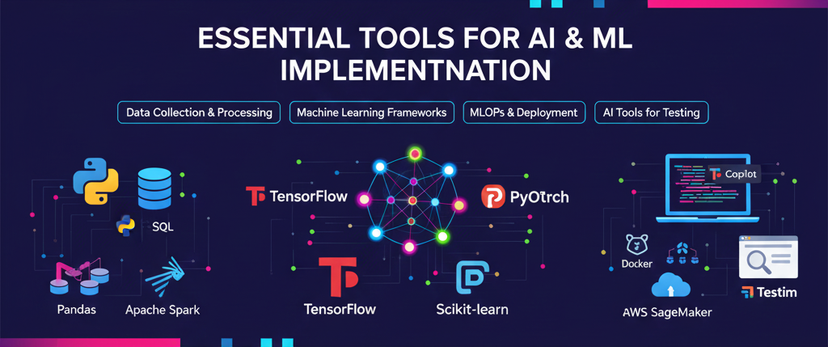
Essential Tools for AI and ML Implementation
1. Data Collection & Processing Tools
- Python (Pandas, NumPy) – Data cleaning and analysis
- Apache Spark – Large-scale data processing
- SQL / NoSQL Databases – Structured and unstructured data
2. Machine Learning & Deep Learning Frameworks
- Scikit-learn – Classical ML algorithms
- TensorFlow – Deep learning and production-ready ML
- PyTorch – Research-friendly and flexible deep learning
- XGBoost / LightGBM – High-performance ML models
3. AI-Powered Development Tools
- GitHub Copilot – AI-assisted coding
- ChatGPT / Claude – Code review, documentation, test generation
- Tabnine – AI code completion
4. MLOps & Deployment Tools
- MLflow – Model tracking and lifecycle management
- Kubeflow – ML workflows on Kubernetes
- Docker & Kubernetes – Scalable model deployment
- AWS SageMaker / Azure ML / Google Vertex AI – End-to-end ML platforms
5. AI Tools for Software Testing & QA
(Especially useful for QA professionals)
- Testim – AI-powered test automation
- Applitools – Visual AI testing
- Functionize – Intelligent functional testing
- Mabl – AI-driven end-to-end testing
6. Monitoring & Analytics Tools
- Prometheus & Grafana – Performance monitoring
- ELK Stack – Logs and analytics
- WhyLabs – AI model observability
Future of AI & ML in IT Projects
AI adoption in IT will continue to grow with:
- Autonomous testing and self-healing automation
- AI-driven DevOps and predictive monitoring
- Intelligent decision-making systems
- Greater use of Generative AI in development and QA
Organizations that adopt AI strategically today will gain a strong competitive advantage tomorrow.
Conclusion
Implementing AI and ML in IT projects is not just about tools—it’s about strategy, data, people, and continuous improvement. By following best practices and leveraging the right tools, IT teams can build scalable, secure, and impactful AI-driven solutions.
Whether you’re a developer, QA professional, or IT manager, now is the right time to integrate AI and ML into your projects and future-proof your career.
Written by

Bhim Mridha
Sr. AI Developer