
Web DesignPublished on 7 min read
10 Must-See APIs for UI Designers to Supercharge Your Workflow

Subhash TiwariDevOps Engineer
On this page
In the dynamic world of UI design, efficiency and realism are key. Gone are the days of static mockups filled with placeholder text. Today's designers must bridge the gap between design and development, creating prototypes that are not only beautiful but also functional and data-driven. The secret weapon? APIs (Application Programming Interfaces).
APIs allow designers to tap into vast resources—from real-time data and diverse content libraries to advanced design tools—streamlining the workflow and bringing prototypes to life faster than ever.
Here are 10 powerful APIs that every UI designer should explore to elevate their craft, categorized by their primary function
1.Content & Asset Integration
Authentic, high-quality content makes a design feel real. These APIs provide a rich well of assets to draw from directly into your prototypes.
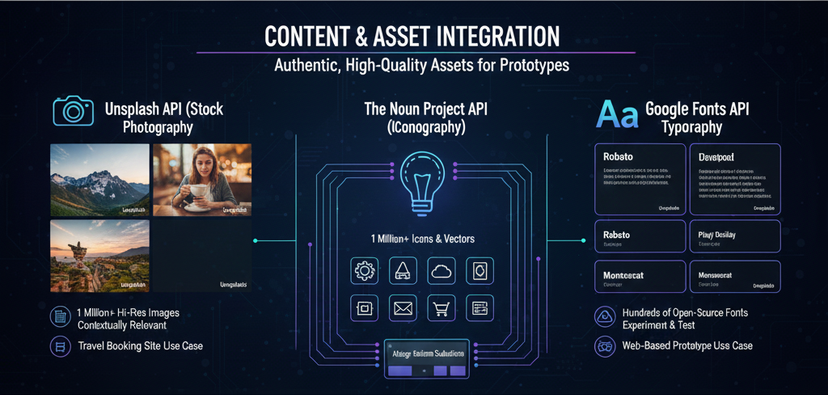
1. Unsplash API (Stock Photography)
- What it does: Provides programmatic access to over a million high-resolution, free-to-use images from the Unsplash community.
- Why a UI Designer needs it: Stop using generic image placeholders! The Unsplash API lets you quickly inject realistic, diverse, and contextually relevant stock photos into your designs or prototypes. This makes user testing more effective and presentations more compelling. You can search by keywords, size, and even random categories.
- Use Case: Building a travel booking site prototype. Use the API to display genuine photos of user-searched destinations.
2. The Noun Project API (Iconography)
- What it does: Offers access to a massive library of over 8 million icons and vectors for just about any concept imaginable.
- Why a UI Designer needs it: Icons are the visual shorthand of a UI. This API makes it incredibly simple to integrate a consistent, high-quality iconography set into your design system or prototype, ensuring your visual language is universal and lightweight.
- Use Case: Automating the icon selection process for a large design system based on semantic labels.
3. Google Fonts API (Typography)
- What it does: Provides access to a directory of hundreds of open-source fonts. It serves the font files efficiently to browsers and applications.
- Why a UI Designer needs it: Typography is the cornerstone of good UI. This API allows designers and developers to experiment with a vast collection of universally available, lightweight fonts without needing to host the files themselves, ensuring consistency across design and final implementation.
- Use Case: Quickly trying out different font pairings in a web-based prototype environment to test readability and brand fit.
2. Color, Style & Theme APIs
Achieving visual harmony often comes down to the perfect color palette or gradient. These APIs automate and perfect your visual style.
4. Color API (Color Management)
- What it does: A robust tool that can identify colors, generate color palettes (e.g., complementary, triadic), convert between formats (like HEX, RGB, HSL), and return detailed color analyses.
- Why a UI Designer needs it: This API is a Swiss-Army knife for design systems. It allows you to programmatically manage and manipulate color variables, ensuring a mathematically consistent and accessible palette.
- Use Case: Developing a dark mode theme where all existing colors must be automatically recalculated to maintain contrast and visual weight.
5. UI Gradients API (Color Gradients)
- What it does: A simple API that offers a collection of beautiful, curated color gradients.
- Why a UI Designer needs it: Gradients can add depth and flair to a modern UI. This API lets you integrate crisp, gorgeous color transitions into components with a straightforward API call, moving beyond static hex codes.
- Use Case: Dynamically assigning a unique, professional gradient background to different user profile cards in a prototype to differentiate them visually.

3. Data & Prototyping APIs
Prototypes need realistic data to truly test the user experience. These APIs provide the mock data and connections you need.
6. Mockaroo or JSON Server (Mock Data Generation)
- What it does: These tools (often acting as mock APIs) allow you to generate large volumes of realistic, customized, and randomized test data (e.g., names, addresses, product lists, dates).
- Why a UI Designer needs it: Realistic data makes a prototype feel real. You can mock your backend API and load your designs with meaningful, varied information, which is crucial for testing layouts, data visualization, and edge cases.
- Use Case: Designing a dashboard. Use a mock API to populate tables and charts with thousands of rows of realistic-looking sales data to check loading states and layout scalability.
7. Airtable API (Database & Data Management)
- What it does: Airtable is a flexible spreadsheet-database hybrid. Its API allows developers (and designers in their prototypes) to fetch, create, and modify data stored in an Airtable base.
- Why a UI Designer needs it: It provides an easy-to-manage database backend without needing heavy developer tools. A designer can update content in a simple spreadsheet, and the prototype instantly reflects the change, making A/B testing copy and content much faster.
- Use Case: Creating a content-heavy prototype (like a news feed or product catalog) where the content can be managed and updated by non-technical team members via the Airtable spreadsheet.
4. Workflow & Collaboration APIs
These tools are essential for bridging the gap between design, development, and user insights.

8. Figma API (Design-to-Dev Handoff)
- What it does: Allows programmatic access to Figma files, components, styles, and data.
- Why a UI Designer needs it: This is the ultimate design system tool. The Figma API enables developers to automatically pull design tokens, styles, and assets directly into the codebase, ensuring pixel-perfect consistency between the source of truth (Figma) and the final product. It also allows for automation of design system tasks.
- Use Case: Automatically generating CSS variables or React components based on the color and typography styles defined in the Figma file.
9. Dropbox API (File Sharing and Collaboration)
- What it does: Enables applications to interact with files and folders stored in Dropbox.
- Why a UI Designer needs it: Designers constantly need to share heavy design files, assets, and documentation. Integrating the Dropbox API into a workflow or internal tool simplifies file management, version control, and collaboration, making the handoff process seamless.
- Use Case: Building an internal portal where the latest design specs (PDFs, style guides) and source files are automatically synced and displayed from a specific Dropbox folder.
10. Google Analytics API (User Behavior Tracking)
- What it does: Provides access to custom user behavior data, such as page views, click-through rates, and conversion funnels.
- Why a UI Designer needs it: Great design is data-driven. While this is primarily a developer's tool for implementation, understanding and utilizing this API is key for closing the feedback loop. Designers can query custom dashboards to track how their design choices (e.g., a new button placement) perform in the wild, removing guesswork from future design iterations.
- Use Case: Creating a custom dashboard that visualizes the drop-off rates for a new checkout flow, allowing the design team to pinpoint the exact failure point in the UI.
10 APIs for UI Designers: A Quick Comparison
| API | Core Function | Best For UI Designers Who Need... | Key Designer Benefit | Typical Use Case |
|---|---|---|---|---|
| Figma API | Design-to-Dev Handoff & Automation | Programmatic access to design files, styles, and components. | Ensures consistency between design system and code via design tokens. | Automatically generating CSS variables or React components from a Figma file's styles. |
| Unsplash API | Real-Time Stock Photography | High-quality, free-to-use images for realistic content injection. | Eliminates placeholder images and improves prototype fidelity. | Populating a travel blog prototype with authentic, searchable photos of destinations. |
| Mockaroo (Mock Data) | Realistic Data Generation | Generating structured, random data (names, dates, products) for prototypes. | Tests scalability and layout handling of complex, data-heavy UIs. | Filling a dashboard with thousands of rows of realistic sales and user data. |
| Google Fonts API | Typography Integration | Easy, fast access to a vast library of open-source, web-safe fonts. | Guarantees font consistency between design and live product performance. | Quickly testing different font pairings in a web prototype to check readability. |
| The Noun Project API | Iconography & Symbols | Access to millions of vector icons to build out a comprehensive icon library. | Simplifies icon management and ensures a consistent visual language. | Programmatically retrieving specific icons for new features in a design system. |
| Color API | Advanced Color Management | Identifying colors, generating accessible palettes, and format conversion (HEX, RGB). | Automates color tasks and ensures mathematically correct, accessible palettes. | Programmatically recalculating a palette to generate an accessible Dark Mode theme. |
| Airtable API | Content Management Backend | A flexible, user-friendly database to manage content for prototypes. | Allows non-technical teams (Copywriters, PMs) to update prototype content instantly. | Powering a product catalog prototype where product details are edited in a spreadsheet. |
| UI Gradients API | Gradient Generation | A curated collection of beautiful, modern color gradients. | Adds visual flair and depth to UIs without manual color mixing. | Dynamically assigning different, professional-looking gradient backgrounds to user profile cards. |
| Google Analytics API | User Behavior Tracking | Access to custom user data, click-throughs, and conversion rates. | Closes the feedback loop by providing data to drive design decisions and validation. | Building a custom dashboard to track how a new checkout button performs post-launch. |
| Dropbox API | File Sharing & Storage | Managing large design files, assets, and documentation across teams. | Streamlines asset handoff and ensures everyone is working with the latest file versions. | Creating a script to pull the latest version of the master brand style guide PDF into a project portal. |
Final Thoughts
APIs are no longer just for developers. By incorporating these services into your design stack, you transition from creating static pictures to building dynamic, data-rich, and realistic prototypes. This shift not only accelerates your workflow but fundamentally improves the quality of your design output and the handoff process. Embrace the API economy and redefine what it means to be a modern UI designer.
Written by

Subhash Tiwari
DevOps Engineer