
Automation testingPublished on 3 min read
Unlocking AI-Powered Testing: A Deep Dive into Cypress Prompt

Anshul TiwariVP of Technology & Solutions
On this page
Generative AI is changing how we write code, and testing is no exception. Tools implementing a feature often referred to as "Cypress Prompt" (or similar names like Test Generator, AI Assistant, etc.) empower developers to generate complex, functional Cypress code using simple English instructions
What is Cypress Prompt?
The term "Cypress Prompt" refers to an AI-driven functionality that translates natural language text (the prompt) into executable Cypress test code. It's a powerful integration designed to accelerate test creation, lower the bar for entry into E2E testing, and minimize boilerplate code.
The core goal is to let you describe what you want to test—e.g., "Log in the user, navigate to the settings page, and verify the 'Save' button is disabled"—and have the AI generate the necessary cy.visit(), cy.get(), cy.type(), and assertions.
cy. prompt Supports Two Flexible Workflows
While cy.prompt() is not a standard Cypress command, an AI-powered Cypress tool typically supports the following two main workflows for integrating code generation:
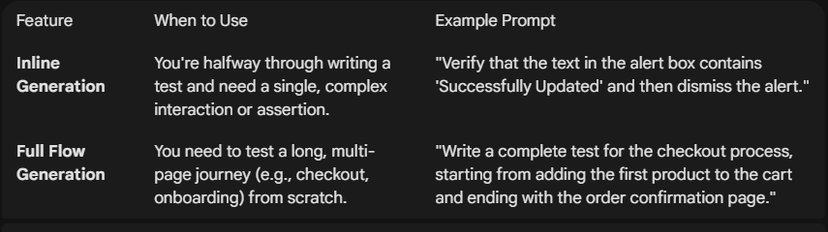
Workflow 1: Inline Command Generation (The "Next Step" Approach)
This workflow is used when you are writing a test and need a quick block of code for a specific action.
- How it works: You insert the AI prompt directly into your test file, often using a special syntax or a comment. The tool then replaces that prompt with the generated Cypress commands.
- Best for: Adding new steps to an existing test, quickly generating complex assertions, or handling simple element interactions.
Workflow 2: Full Test File Generation (The "Start from Scratch" Approach)
This workflow is used when starting a new test from zero.
- How it works: You provide a comprehensive prompt describing an entire user flow (e.g., "The complete purchase flow on the e-commerce site"). The AI generates the entire spec file, including describe, it, and all the necessary Cypress commands.
- Best for: Creating new spec files, onboarding new testers, and rapid prototyping of test suites.
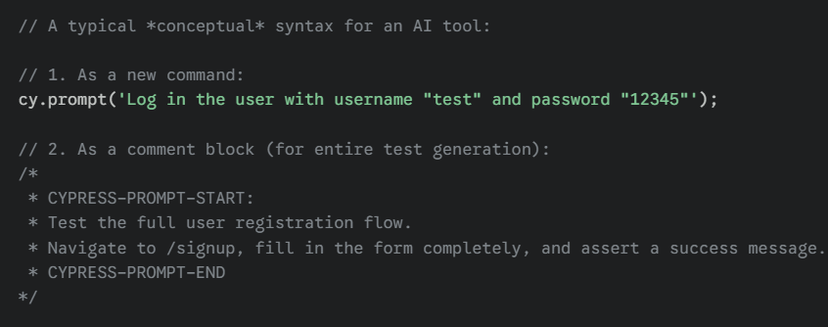
Syntax (Conceptual)
Since this is an AI feature, the syntax is often designed to look like a standard Cypress command or a special comment block for easy parsing.
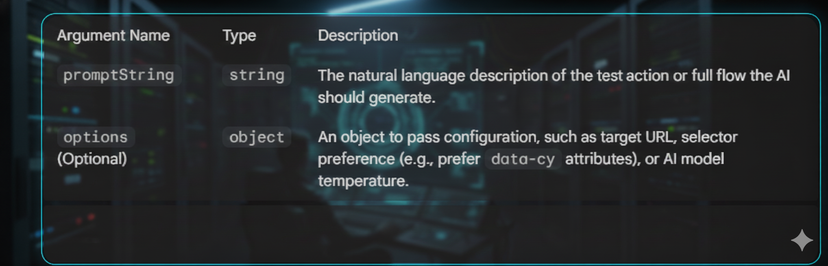
Arguments
- The primary argument for the Cypress Prompt feature is the natural language string itself.
How It Works
The magic lies in how the AI processes your prompt and translates it into the precise, chained structure Cypress requires.
- Input Parsing: The tool extracts the promptString from the code.
- AI Processing: The string is sent to a Large Language Model (LLM) (like GPT-4 or Gemini) trained on Cypress's documentation, API, and thousands of real-world test examples.
- Command Translation: The LLM translates user intentions (e.g., "click the main button") into specific Cypress commands (cy.get('button#main').click()).
- Contextualization: For advanced tools, the LLM may also use context from existing test files, custom commands, and even the application's source code (if provided) to choose the best selectors (e.g., using data-cy attributes you already defined).
- Code Output: The generated Cypress code (JavaScript or TypeScript) is returned and then inserted into the spec file, replacing the original prompt.
Choose Your Workflow
How to Write Effective Prompts
The quality of the generated code is directly proportional to the quality of the prompt. Treat the AI like a new, very literal junior developer.

Viewing and Exporting Generated Code
Most tools offer a review process before the code is permanently added to your file system:
- Preview Pane: The tool displays the generated code in a side-by-side view, showing the original prompt and the proposed code.
- Review and Accept: The developer can then review, make minor edits, and press a button (e.g., "Accept Code" or "Insert") to overwrite the prompt with the functional Cypress code.
- Export: The generated code is saved as a standard .cy.js (or .ts) file, ready to be run in the Cypress Test Runner.
Setup
Setting up an AI-driven Cypress tool typically involves a few steps:
- Installation: Install the tool via npm: npm install <tool-name> --save-dev
- Configuration: Configure the tool's settings (often in cypress.config.js) to point it to your project, specify selector preferences, and define any custom commands it should be aware of.
- API Key: Add your necessary AI provider API key (e.g., OpenAI or Google Gemini key) as an environment variable (.env file) for authentication.
Limitations
Despite its power, AI generation is not a silver bullet. You must review and own the generated code.
- Hallucination: The AI might generate commands for elements that do not exist in your specific application, requiring manual selector correction.
- Best Practice Adherence: While LLMs are trained on best practices, they may sometimes use brittle selectors (like :nth-child()) that you will need to refactor.
- Complex Logic: The AI struggles with highly complex conditional logic, proprietary UI frameworks, or custom component state management.
- Network Constraints: The tool requires an active internet connection to communicate with the LLM API.
Written by

Anshul Tiwari
VP of Technology & Solutions