Top Docker Compose Templates Every Developer Should Use
Introduction: Why Docker Compose Matters More Than Ever
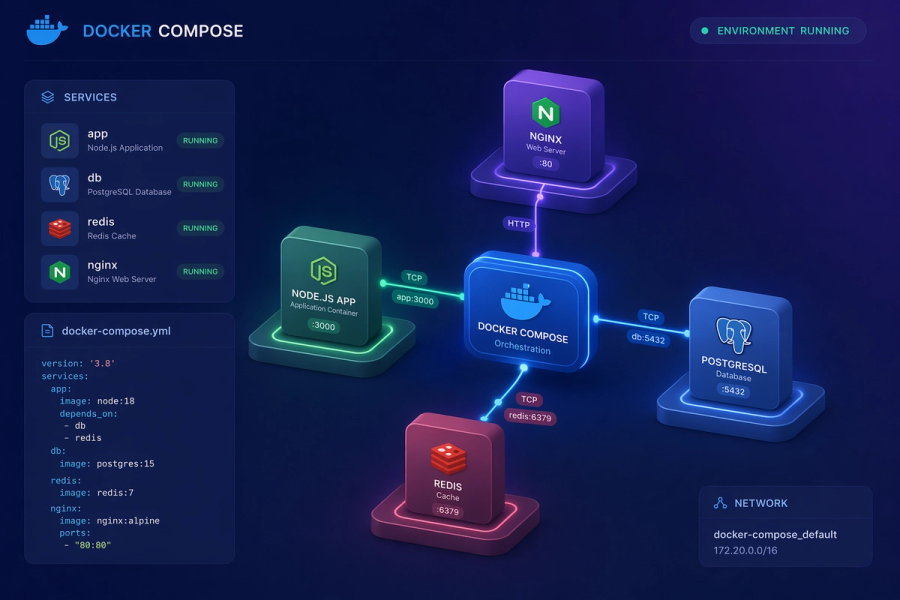
In today’s development world, applications are no longer single, simple programs. A typical app might include a backend API, a frontend interface, a database, a caching layer, and even background workers—all working together.
Managing these services individually is not just time-consuming, it’s error-prone.
This is exactly where Docker Compose becomes an essential tool.
Instead of manually starting each service, configuring ports, and handling dependencies, Docker Compose allows you to define your entire application stack in a single file and run it with one command.
It’s not just a convenience—it’s a standardized way to build, run, and share development environments.
What is a Docker Compose Template?
A Docker Compose template is a pre-configured YAML file (docker-compose.yml) that defines how multiple containers should run together.
Think of it like a blueprint for your application environment.
Inside a template, you’ll typically find:
- Services → Your app, database, cache, etc.
- Volumes → Persistent storage
- Networks → Communication between containers
- Environment Variables → Configuration values
Instead of building everything from scratch, templates let you reuse proven setups.
Why Developers Rely on Docker Compose Templates
1. Eliminates Setup Friction
No more installing databases manually or configuring services differently on each machine.
2. Consistent Across Teams
Every developer runs the exact same environment → fewer bugs caused by environment mismatch.
3. Faster Development Cycle
Start your entire system in seconds instead of minutes or hours.
4. Easy Experimentation
Want to try Redis or Kafka? Just add a service—no system-level installation needed.
1. Web Application + Database Template
What This Template Represents
This is the foundation of most applications—a backend service connected to a database.
It mirrors real-world systems where your application logic and data storage are separate but tightly connected.
Why This Template is Important
Almost every application needs to:
- Store user data
- Fetch and update records
- Maintain persistence
Without a database, your app is incomplete.
When You Should Use It
- Building REST APIs
- Creating SaaS platforms
- Developing CRUD applications
- Learning backend development
Example Template
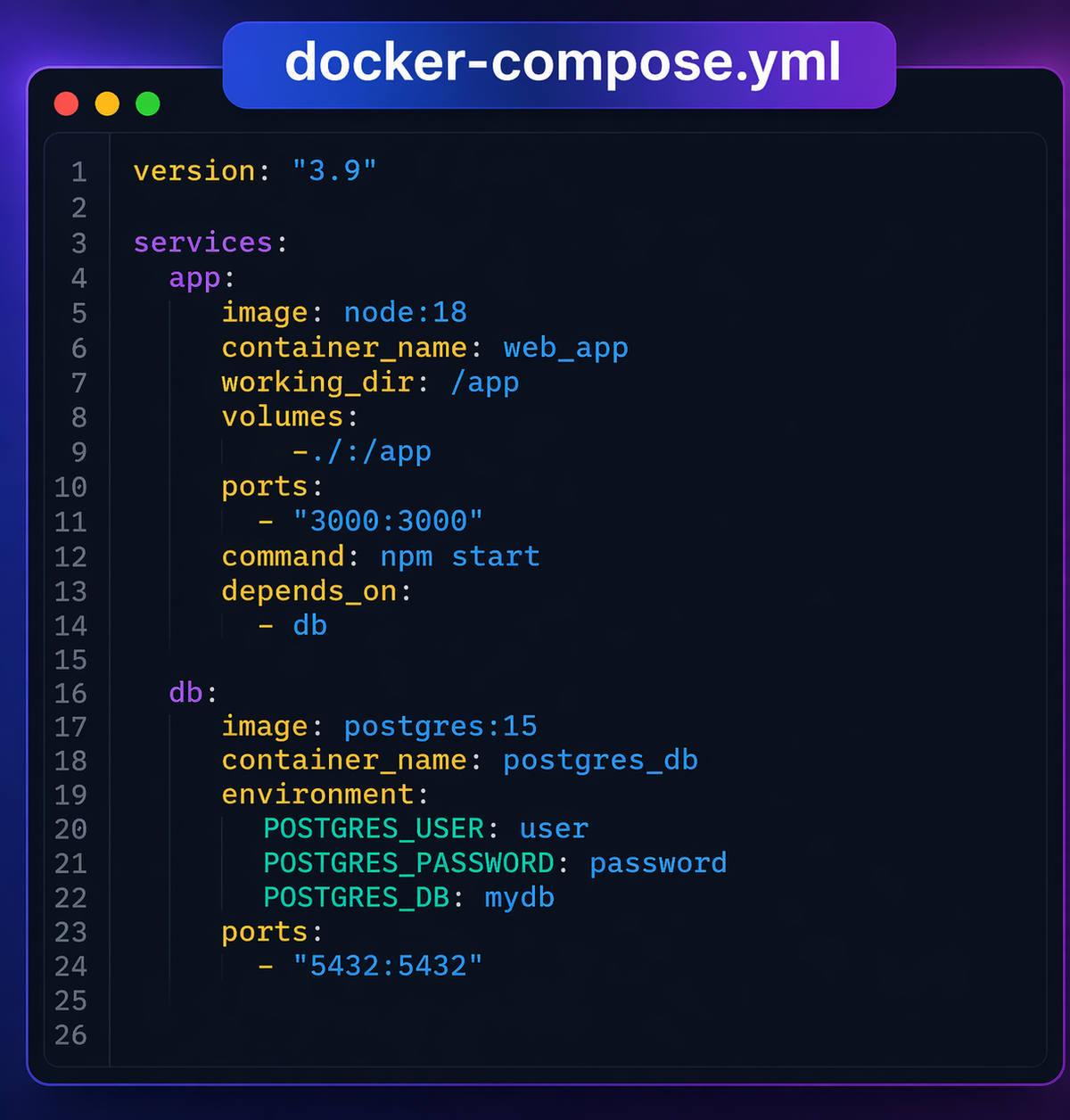
How It Works (Step-by-Step Understanding)
- The app service runs your backend code.
- The db service runs PostgreSQL.
depends_onensures the database starts before the app.- Both services communicate over Docker’s internal network.
How to Use It Practically
- Save the file as
docker-compose.yml - Run:
docker-compose up
- Your backend starts on
localhost:3000 - Your database is accessible on
localhost:5432
Real-World Insight
In production, your app and database are rarely on the same machine—but this template simulates that architecture locally.
2. Full-Stack Application Template
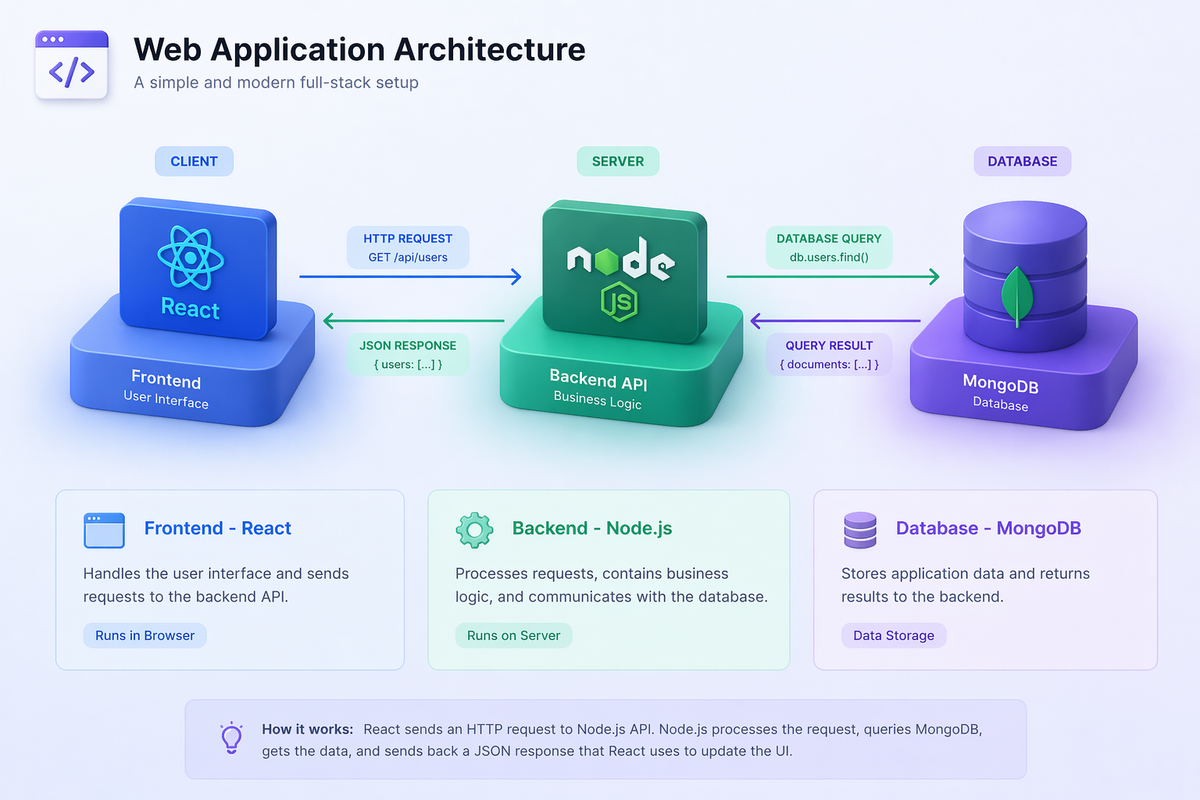
What This Template Represents
This template expands the previous setup by adding a frontend layer.
Now you have:
- Frontend (UI)
- Backend (logic)
- Database (storage)
Why This Template is Powerful
It gives you a complete development environment that behaves like a real production system.
When to Use It
- Building modern web apps (React, Vue, Angular)
- Developing SaaS dashboards
- Testing frontend-backend integration
Example Template
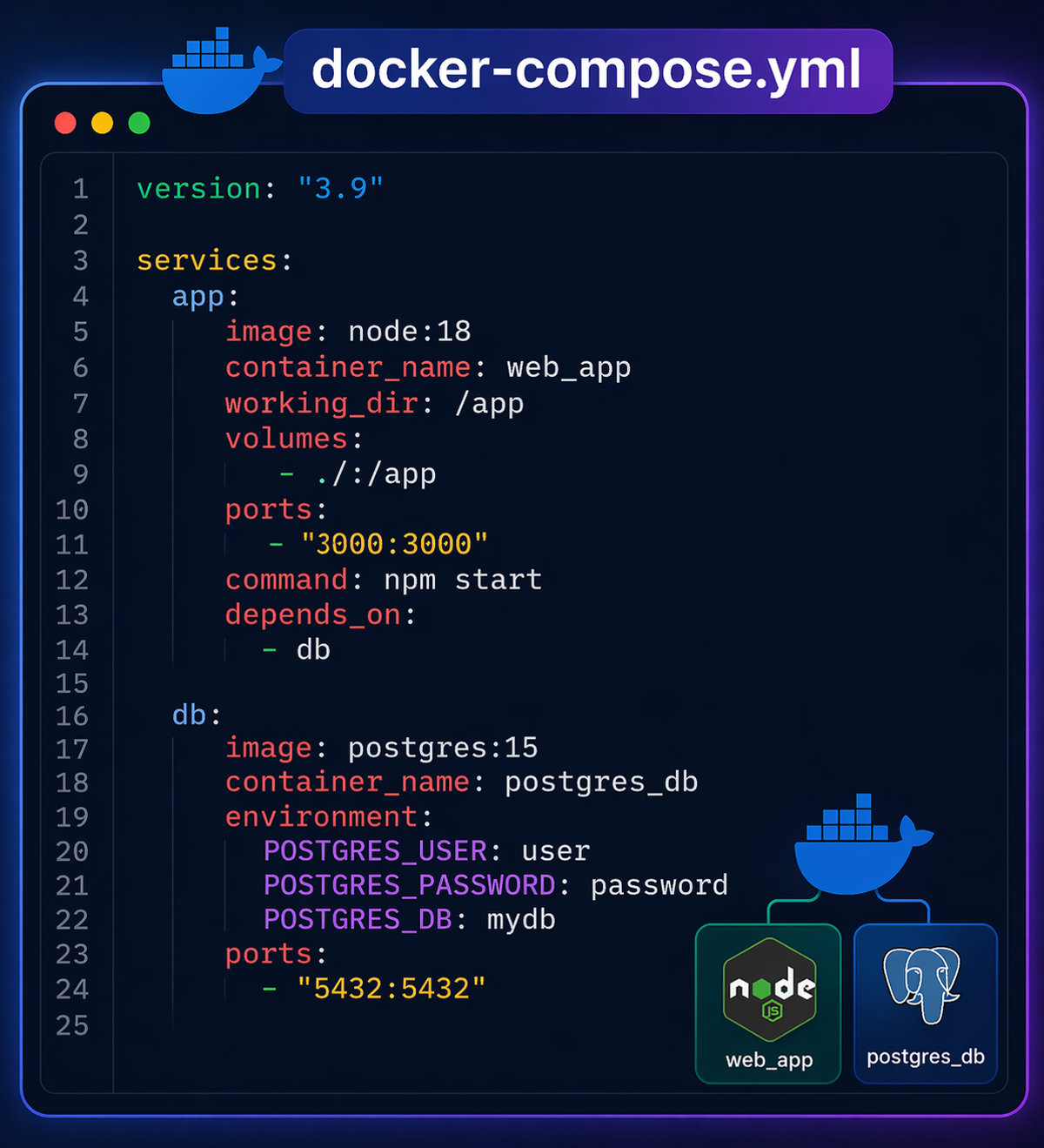
How It Works
- Frontend runs separately but calls backend APIs
- Backend connects to database
- All services are isolated but connected internally
Practical Benefit
You can develop frontend and backend independently while still running everything together.
3. Nginx Reverse Proxy Template
What This Template Represents
A traffic manager that sits in front of your services and routes requests.
Why It’s Critical
As your app grows, you may have:
- Multiple APIs
- Multiple frontend apps
- Different services running on different ports
Nginx helps unify everything under one entry point.
When to Use It
- Microservices architecture
- Multi-app systems
- Production-ready setups
Key Concept
Instead of accessing:
localhost:3000localhost:5000
You access everything via:
localhost→ Nginx decides where to route
Real-World Example
This is exactly how large-scale applications handle traffic.
4. Redis Cache Template
What This Template Represents
A high-speed in-memory data store used for caching.
Why It Matters
Databases can be slow under heavy load. Redis:
- Stores frequently accessed data
- Reduces database queries
- Improves response time
When to Use It
- High-traffic applications
- Authentication sessions
- Real-time features
Real-World Impact
Apps like social media platforms rely heavily on caching to stay fast.
5. Microservices Template
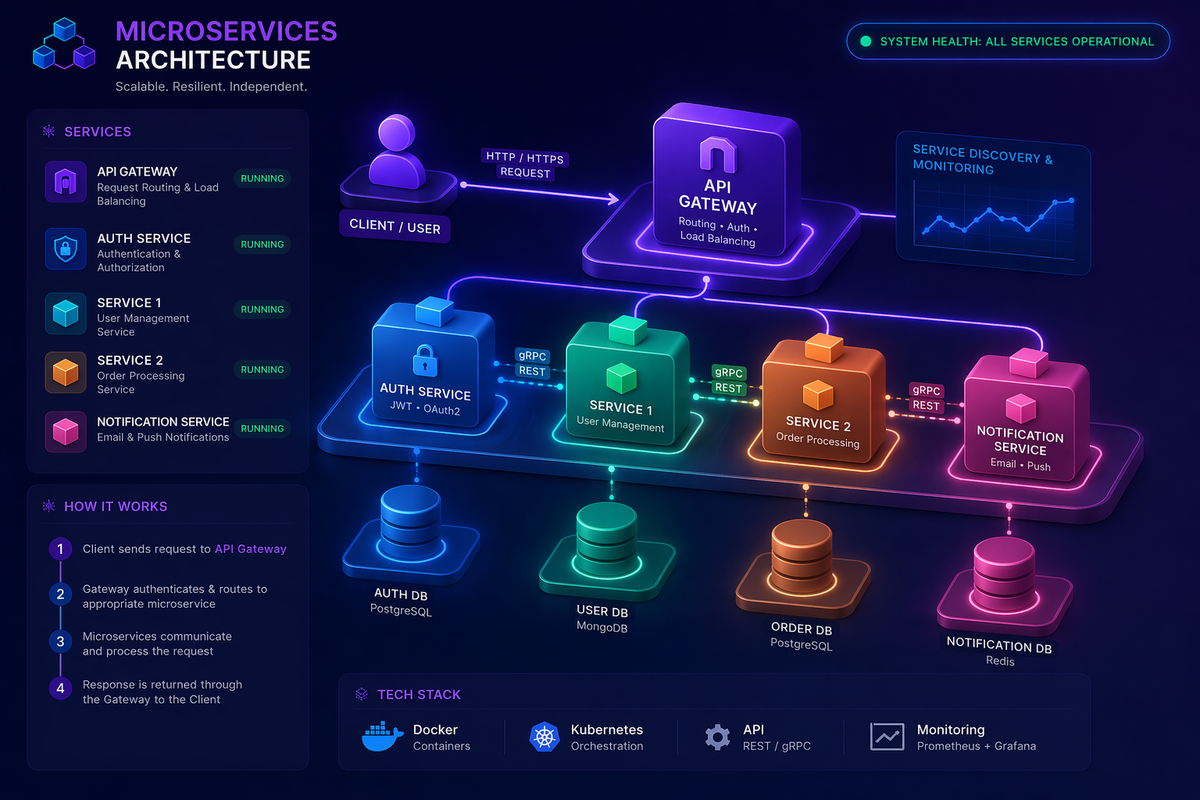
What This Template Represents
Instead of one big application, your system is divided into small independent services.
Why Developers Use It
- Easier to scale
- Independent deployments
- Better fault isolation
When to Use It
- Large applications
- Teams working on different modules
- Scalable SaaS products
Important Insight
Each service can:
- Use a different language
- Have its own database
- Be deployed independently
6. ELK Stack (Logging System)
What This Template Represents
A centralized logging system:
- Elasticsearch → stores logs
- Logstash → processes logs
- Kibana → visualizes logs
Why It’s Essential
Debugging becomes extremely difficult when logs are scattered.
This stack gives you:
- Searchable logs
- Visual dashboards
- Real-time monitoring
When to Use It
- Production systems
- Microservices
- Debugging complex issues
7. CI/CD Testing Template
What This Template Represents
A controlled environment for running automated tests.
Why It’s Important
Testing must be:
- Repeatable
- Isolated
- Consistent
When to Use It
- Before deployment
- In CI pipelines
- During development
Real Benefit
Your tests run in the same environment every time → reliable results.
Best Practices You Should Never Ignore
Use Environment Variables
Never hardcode sensitive data.
Use Volumes for Data Persistence
Containers can stop, but your data should not disappear.
Keep Containers Focused
One service = one responsibility.
Use Networks Smartly
Isolate services for better security and clarity.
When Docker Compose is NOT Enough
While powerful, Docker Compose has limits.
Avoid using it for:
- Large-scale production orchestration
- Auto-scaling systems
- Cloud-native distributed infrastructure
In such cases, tools like Kubernetes are more suitable.
Final Thoughts
Docker Compose templates are more than just configuration files—they are productivity accelerators.
They help you:
- Build faster
- Collaborate better
- Reduce errors
- Simulate real-world architectures
Whether you're a beginner or an experienced developer, mastering these templates will significantly improve your development workflow.
Written by